
Congrats to all winners,
\n\nCongrats to my teammate @tarobxl achieving GM tier and @anjum48 for his master tier.
\n\nOn behalf of the team, I would like to make the writeup.
\n\nWe have three types of preprocessing data.
\n1. Imaging with multiple windows.
\n We use three windows to construct RGB image. Each channel is corresponded to a window. \n \n 'brain': [40, 80],\n 'bone': [600, 2800],\n 'subdual': [75, 215]\n
Imaging with multiple windows then crop.
\nSame as (1), we crop and keep the only informative part.
Imaging with spatially adjacent.
\nWe use only one window [40, 80] for preprocessing. To construct RGB images, we use metadata to know the spaitally adjacent. Let say to construct RGB of slice St, we take:
\nR = St-1, G = St, B = St+1.
Finally, we crop and keep only informative parts as same as (2). \nPlease refer this kernel for more detail: \nhttps://www.kaggle.com/anjum48/preprocessing-adjacent-images-and-cropping
First, we remove the overlapped patients between train and test. This part may be the reason for the shakeup since we estimate that the shakeup score is in a range of 0.001 - 0.002.
\n\nIn each fold, we do random sampling such that the number of positive patients ar balanced to the number of negative patients. This step helps to have the correlation between CV and LB, and stable as well.
\n\nWe train 5 Folds splitted by patients. The models and their performance on stage 2:
\n\n|No. | Model | Data | Before PP | After PP|\n|---|---------- |:-------------:|-------------------------|---:|\n|1. | Resnet18 | (1) | 0.060 | 0.054 |\n|2. | Resnet34 | (1) | - | - |\n|3. | Resnet50 | (1) | 0.058 | 0.052 | \n|4. | Resnet50 | (3) | 0.054 | 0.051 |\n|5. | Densenet169 | (2) | 0.055 | 0.049 | \n|6. | InceptionV3 + Deepsupervision | (1) | 0.060 | 0.053 |\n|7. | EfficientNet-B0 | (3) | 0.054 | 0.051 |\n|8. | EfficientNet-B3 | (2) | 0.055 | 0.050 |\n|9. | EfficientNet-B5 | (3) | 0.048 | 0.048 |
\n\nPP =Post-processing.
\n\nWe have three pipelines, the following is mine which is used to train the model No. 1,2,3,4,5.
Stages:
\n\nWarmup: Freeze the backbone, train the FC only.
\n\nWarmup: Unfreeze the backbone, train all the model.
\n\nAugmentations: \npython\nResize(*image_size),\nHorizontalFlip(),\nOneOf([\n ElasticTransform(alpha=120, sigma=120 * 0.05, alpha_affine=120 * 0.03),\n GridDistortion(),\n OpticalDistortion(distort_limit=2, shift_limit=0.5),\n], p=0.3),\nShiftScaleRotate(shift_limit=0.05, scale_limit=0.1, rotate_limit=10),\n
TTA: Normal + HFlip.
By this pipeline, I finish the training at around 8-10 epochs. The deep models (SEResnext50, resnet101, etc) do not work well. Training with longer epochs (upto 25) leads to be overfitted.
\n\nWe leverage metadata and use H2O to build a model for post-processing. \nMore details will come up by @tarobxl.
\n\nFirst, the do post-processing for each prediction of each model.
\nSecond, we use the stacking pipeline designed by magician @mathormad. \nPlease upvote this topic: \nhttps://www.kaggle.com/c/imaterialist-challenge-fashion-2018/discussion/57934
Update:
\nStacking pipeline is shared at:
\nhttps://www.kaggle.com/mathormad/5th-place-solution-stacking-pipeline
\nDont hesitate to upvote it.
My pipeline code is published at:
\nhttps://github.com/ngxbac/Kaggle-RSNA
\nThe model checkpoints, graph, training processes are recorded by wandb.\nhttps://app.wandb.ai/ngxbac/Kaggle-RSNA
@anjum48 's pipeline: \nhttps://github.com/Anjum48/rsna-ich
\n\n@mathormad's pipeline to train InceptionV3 + Deepsupervision:
\nhttps://github.com/triducnguyentang/RSNA
@tarobxl 's post-processing code: \nhttps://github.com/tiendzung-le/Kaggle-RSNA-5th-place-Solution
", "messages": [ { "id": 672627, "postDate": "2019-11-14T02:56:06.647Z", "content": "Congrats to all winners,
\n\nCongrats to my teammate @tarobxl achieving GM tier and @anjum48 for his master tier.
\n\nOn behalf of the team, I would like to make the writeup.
\n\nWe have three types of preprocessing data.
\n1. Imaging with multiple windows.
\n We use three windows to construct RGB image. Each channel is corresponded to a window. \n \n 'brain': [40, 80],\n 'bone': [600, 2800],\n 'subdual': [75, 215]\n
Imaging with multiple windows then crop.
\nSame as (1), we crop and keep the only informative part.
Imaging with spatially adjacent.
\nWe use only one window [40, 80] for preprocessing. To construct RGB images, we use metadata to know the spaitally adjacent. Let say to construct RGB of slice St, we take:
\nR = St-1, G = St, B = St+1.
Finally, we crop and keep only informative parts as same as (2). \nPlease refer this kernel for more detail: \nhttps://www.kaggle.com/anjum48/preprocessing-adjacent-images-and-cropping
First, we remove the overlapped patients between train and test. This part may be the reason for the shakeup since we estimate that the shakeup score is in a range of 0.001 - 0.002.
\n\nIn each fold, we do random sampling such that the number of positive patients ar balanced to the number of negative patients. This step helps to have the correlation between CV and LB, and stable as well.
\n\nWe train 5 Folds splitted by patients. The models and their performance on stage 2:
\n\n|No. | Model | Data | Before PP | After PP|\n|---|---------- |:-------------:|-------------------------|---:|\n|1. | Resnet18 | (1) | 0.060 | 0.054 |\n|2. | Resnet34 | (1) | - | - |\n|3. | Resnet50 | (1) | 0.058 | 0.052 | \n|4. | Resnet50 | (3) | 0.054 | 0.051 |\n|5. | Densenet169 | (2) | 0.055 | 0.049 | \n|6. | InceptionV3 + Deepsupervision | (1) | 0.060 | 0.053 |\n|7. | EfficientNet-B0 | (3) | 0.054 | 0.051 |\n|8. | EfficientNet-B3 | (2) | 0.055 | 0.050 |\n|9. | EfficientNet-B5 | (3) | 0.048 | 0.048 |
\n\nPP =Post-processing.
\n\nWe have three pipelines, the following is mine which is used to train the model No. 1,2,3,4,5.
Stages:
\n\nWarmup: Freeze the backbone, train the FC only.
\n\nWarmup: Unfreeze the backbone, train all the model.
\n\nAugmentations: \npython\nResize(*image_size),\nHorizontalFlip(),\nOneOf([\n ElasticTransform(alpha=120, sigma=120 * 0.05, alpha_affine=120 * 0.03),\n GridDistortion(),\n OpticalDistortion(distort_limit=2, shift_limit=0.5),\n], p=0.3),\nShiftScaleRotate(shift_limit=0.05, scale_limit=0.1, rotate_limit=10),\n
TTA: Normal + HFlip.
By this pipeline, I finish the training at around 8-10 epochs. The deep models (SEResnext50, resnet101, etc) do not work well. Training with longer epochs (upto 25) leads to be overfitted.
\n\nWe leverage metadata and use H2O to build a model for post-processing. \nMore details will come up by @tarobxl.
\n\nFirst, the do post-processing for each prediction of each model.
\nSecond, we use the stacking pipeline designed by magician @mathormad. \nPlease upvote this topic: \nhttps://www.kaggle.com/c/imaterialist-challenge-fashion-2018/discussion/57934
Update:
\nStacking pipeline is shared at:
\nhttps://www.kaggle.com/mathormad/5th-place-solution-stacking-pipeline
\nDont hesitate to upvote it.
My pipeline code is published at:
\nhttps://github.com/ngxbac/Kaggle-RSNA
\nThe model checkpoints, graph, training processes are recorded by wandb.\nhttps://app.wandb.ai/ngxbac/Kaggle-RSNA
@anjum48 's pipeline: \nhttps://github.com/Anjum48/rsna-ich
\n\n@mathormad's pipeline to train InceptionV3 + Deepsupervision:
\nhttps://github.com/triducnguyentang/RSNA
@tarobxl 's post-processing code: \nhttps://github.com/tiendzung-le/Kaggle-RSNA-5th-place-Solution
", "rawMarkdown": "Congrats to all winners, \n\nCongrats to my teammate @tarobxl achieving GM tier and @anjum48 for his master tier. \n\nOn behalf of the team, I would like to make the writeup. \n\n# Image Preprocessing \nWe have three types of preprocessing data. \n1. Imaging with multiple windows. \n We use three windows to construct RGB image. Each channel is corresponded to a window. \n ```\n 'brain': [40, 80],\n 'bone': [600, 2800],\n 'subdual': [75, 215]\n ``` \n\n2. Imaging with multiple windows then crop. \n Same as (1), we crop and keep the only informative part.\n\n3. Imaging with spatially adjacent. \n We use only one window [40, 80] for preprocessing. To construct RGB images, we use metadata to know the spaitally adjacent. Let say to construct RGB of slice St, we take: \n R = St-1, G = St, B = St+1. \n\n Finally, we crop and keep only informative parts as same as (2). \n Please refer this kernel for more detail: \n https://www.kaggle.com/anjum48/preprocessing-adjacent-images-and-cropping\n\n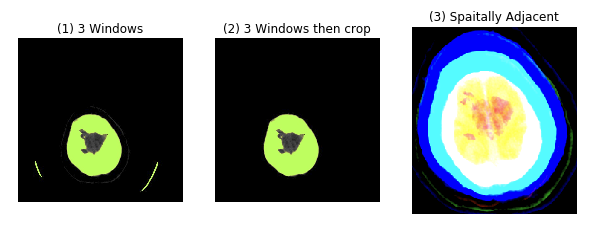\n\n# Data Preprocessing \nFirst, we remove the overlapped patients between train and test. This part may be the reason for the shakeup since we estimate that the shakeup score is in a range of 0.001 - 0.002.\n\nIn each fold, we do random sampling such that the number of positive patients ar balanced to the number of negative patients. This step helps to have the correlation between CV and LB, and stable as well. \n\n# Modeling \nWe train 5 Folds splitted by patients. The models and their performance on stage 2: \n\n|No. | Model | Data | Before PP | After PP|\n|---|---------- |:-------------:|-------------------------|---:|\n|1. | Resnet18 | (1) | 0.060 | 0.054 |\n|2. | Resnet34 | (1) | - | - |\n|3. | Resnet50 | (1) | 0.058 | 0.052 | \n|4. | Resnet50 | (3) | 0.054 | 0.051 |\n|5. | Densenet169 | (2) | 0.055 | 0.049 | \n|6. | InceptionV3 + Deepsupervision | (1) | 0.060 | 0.053 |\n|7. | EfficientNet-B0 | (3) | 0.054 | 0.051 |\n|8. | EfficientNet-B3 | (2) | 0.055 | 0.050 |\n|9. | EfficientNet-B5 | (3) | 0.048 | 0.048 | \n\nPP =Post-processing. \n\nWe have three pipelines, the following is mine which is used to train the model `No. 1,2,3,4,5`. \n\n* Optimizer: AdamW \n* Image size: 512x512 \n* Stages: \n * Warmup: Freeze the backbone, train the FC only. \n * LR: 0.001\n * num_epochs: 3 \n\n * Warmup: Unfreeze the backbone, train all the model. \n * LR: 0.0001\n * num_epochs: 20 \n * scheduler: ReduceLROnPlateau, patience = 0. \n * EarlyStoppingCallback: patience = 3. \n* Augmentations: \n ```python\n Resize(*image_size),\n HorizontalFlip(),\n OneOf([\n ElasticTransform(alpha=120, sigma=120 * 0.05, alpha_affine=120 * 0.03),\n GridDistortion(),\n OpticalDistortion(distort_limit=2, shift_limit=0.5),\n ], p=0.3),\n ShiftScaleRotate(shift_limit=0.05, scale_limit=0.1, rotate_limit=10),\n ``` \n\n* TTA: Normal + HFlip. \n\nBy this pipeline, I finish the training at around 8-10 epochs. The deep models (SEResnext50, resnet101, etc) do not work well. Training with longer epochs (upto 25) leads to be overfitted. \n\n\n# Post-processing \nWe leverage metadata and use H2O to build a model for post-processing. \nMore details will come up by @tarobxl. \n\n# Stacking \nFirst, the do post-processing for each prediction of each model. \nSecond, we use the stacking pipeline designed by magician @mathormad. \nPlease upvote this topic: \nhttps://www.kaggle.com/c/imaterialist-challenge-fashion-2018/discussion/57934 \n\nUpdate: \nStacking pipeline is shared at: \nhttps://www.kaggle.com/mathormad/5th-place-solution-stacking-pipeline \nDont hesitate to upvote it.\n\n\n# Code \nMy pipeline code is published at: \nhttps://github.com/ngxbac/Kaggle-RSNA \nThe model checkpoints, graph, training processes are recorded by wandb.\nhttps://app.wandb.ai/ngxbac/Kaggle-RSNA \n\n@anjum48 's pipeline: \nhttps://github.com/Anjum48/rsna-ich \n\n@mathormad's pipeline to train InceptionV3 + Deepsupervision: \nhttps://github.com/triducnguyentang/RSNA\n\n@tarobxl 's post-processing code: \nhttps://github.com/tiendzung-le/Kaggle-RSNA-5th-place-Solution\n", "votes": 71 }, { "id": 673036, "postDate": "2019-11-14T12:36:54.110Z", "content": "I would like to thank all of my teammates for their excellent work. Here is a summary of the post-processing, which is actually just a way to leverage a sequential model in order to exploit the 3D information.
\n\nFor each class in ['any', 'epidural', 'intraparenchymal', 'intraventricular', 'subarachnoid', 'subdural'], form a binary classification problem\n1. Sort images in each study_instance_uid by image_position_patient_2\n2. For each image, create the following features\na. The original prediction p0\nb. The predictions of the previous image p_prev and the next image p_next (sorted by image_position_patient_2). Images at the beginning and at the end of each study_instance_uid are ignored.\nc. The statistical features for all images before and all the images after the image in the same study_instance_uid: number of images, mean/std/skew of the original predictions.\n3. Train the model
Then we run the model to generate new predictions.
\n\nIf you want to see the code, here you go. Assume the input dataframe looks like\n\nsop_instance_uid p_any p_epidural p_intraparenchymal p_intraventricular p_subarachnoid p_subdural patient_id study_instance_uid image_position_patient_2 any epidural intraparenchymal intraventricular subarachnoid subdural\n0 ID_45785016b 0.00014 0.00002 0.00001 0.00000 0.00013 0.00004 ID_0002cd41 ID_66929e09d4 35.96800 0 0 0 0 0 0\n1 ID_37f32aed2 0.00056 0.00003 0.00004 0.00001 0.00085 0.00008 ID_0002cd41 ID_66929e09d4 38.48400 0 0 0 0 0 0\n2 ID_1b9de2922 0.00008 0.00001 0.00003 0.00000 0.00010 0.00002 ID_0002cd41 ID_66929e09d4 41.00000 0 0 0 0 0 0\n3 ID_d61a6a7b9 0.00057 0.00002 0.00021 0.00006 0.00046 0.00018 ID_0002cd41 ID_66929e09d4 43.51700 0 0 0 0 0 0\n
The function to create the features in python is \n```\ndef create_features(df, label_col=\"any\", WIN3 = True, is_train=True):\n selected_cols = [id_col] + ordered_cols + [\"p_{}\".format(label_col)]\n if is_train:\n selected_cols.append(label_col)
\n\ndf_sub = df[selected_cols].copy()\ndf_sub.rename(columns={\"p_{}\".format(label_col): \"p\"}, inplace=True)\n\ndf_sub.sort_values(ordered_cols, ascending=True, inplace=True)\ndf_sub.reset_index(drop=True, inplace=True)\ndf_sub.head(10)\n\n# Rank\ndf_sub[\"rank\"] = df_sub.groupby(key_cols)[pos_col].rank(ascending=True).astype(int)\ndf_sub[\"rank_inv\"] = df_sub.groupby(key_cols)[pos_col].rank(ascending=False).astype(int)\ndf_sub_grouped = df_sub.groupby(key_cols)[\"rank\"].count() #.agg({'Label':'max'})\ndf_sub_grouped = df_sub_grouped.to_frame(\"rank_max\").reset_index()\ndf_sub = pd.merge(df_sub, df_sub_grouped, how='left', on=key_cols)\ndf_sub.head()\n\ndef list_std(x):\n return np.std(x[x>0])\n\n# Features\ndf_sub['p1'] = df_sub.groupby(key_cols)['p'].apply(lambda x: x.shift().expanding().mean())\ndf_sub['p1_std'] = df_sub.groupby(key_cols)['p'].apply(lambda x: x.shift().expanding().std())\ndf_sub['p1_skew'] = df_sub.groupby(key_cols)['p'].apply(lambda x: x.shift().expanding().skew())\ndf_sub['p1_list_std'] = df_sub.groupby(key_cols)['p'].apply(lambda x: x.shift().expanding().apply(lambda x: list_std(x), 'raw=False'))\n\ndf_sub['p1_inv'] = df_sub.sort_values(key_cols + [\"rank_inv\"]).groupby(key_cols)['p'].apply(lambda x: x.shift().expanding().mean())\ndf_sub['p1_inv_std'] = df_sub.sort_values(key_cols + [\"rank_inv\"]).groupby(key_cols)['p'].apply(lambda x: x.shift().expanding().std())\ndf_sub['p1_inv_skew'] = df_sub.sort_values(key_cols + [\"rank_inv\"]).groupby(key_cols)['p'].apply(lambda x: x.shift().expanding().skew())\ndf_sub['p1_inv_list_std'] = df_sub.sort_values(key_cols + [\"rank_inv\"]).groupby(key_cols)['p'].apply(lambda x: x.shift().expanding().apply(lambda x: list_std(x), 'raw=False'))\n\ndf_sub[\"rank_perc\"] = df_sub[\"rank\"] / df_sub[\"rank_max\"] \ndf_sub.head()\n\nif WIN3:\n df_sub[\"p_next\"] = df_sub[\"p\"].shift(-1)\n df_sub[\"p_prev\"] = df_sub[\"p\"].shift(+1)\ndf_sub.head()\nreturn df_sub\n```
", "rawMarkdown": "I would like to thank all of my teammates for their excellent work. Here is a summary of the post-processing, which is actually just a way to leverage a sequential model in order to exploit the 3D information. \n\nFor each class in ['any', 'epidural', 'intraparenchymal', 'intraventricular', 'subarachnoid', 'subdural'], form a binary classification problem\n1.\tSort images in each `study_instance_uid` by `image_position_patient_2`\n2.\tFor each image, create the following features\na.\tThe original prediction p0\nb.\tThe predictions of the previous image `p_prev` and the next image `p_next` (sorted by `image_position_patient_2`). Images at the beginning and at the end of each `study_instance_uid` are ignored.\nc.\tThe statistical features for all images before and all the images after the image in the same `study_instance_uid`: number of images, mean/std/skew of the original predictions.\n3.\tTrain the model\n\nThen we run the model to generate new predictions.\n\n\n\nIf you want to see the code, here you go. Assume the input dataframe looks like\n```\nsop_instance_uid\tp_any\tp_epidural\tp_intraparenchymal\tp_intraventricular\tp_subarachnoid\tp_subdural\tpatient_id\tstudy_instance_uid\timage_position_patient_2\tany\tepidural\tintraparenchymal\tintraventricular\tsubarachnoid\tsubdural\n0\tID_45785016b\t0.00014\t0.00002\t0.00001\t0.00000\t0.00013\t0.00004\tID_0002cd41\tID_66929e09d4\t35.96800\t0\t0\t0\t0\t0\t0\n1\tID_37f32aed2\t0.00056\t0.00003\t0.00004\t0.00001\t0.00085\t0.00008\tID_0002cd41\tID_66929e09d4\t38.48400\t0\t0\t0\t0\t0\t0\n2\tID_1b9de2922\t0.00008\t0.00001\t0.00003\t0.00000\t0.00010\t0.00002\tID_0002cd41\tID_66929e09d4\t41.00000\t0\t0\t0\t0\t0\t0\n3\tID_d61a6a7b9\t0.00057\t0.00002\t0.00021\t0.00006\t0.00046\t0.00018\tID_0002cd41\tID_66929e09d4\t43.51700\t0\t0\t0\t0\t0\t0\n```\n\nThe function to create the features in python is \n```\ndef create_features(df, label_col=\"any\", WIN3 = True, is_train=True):\n selected_cols = [id_col] + ordered_cols + [\"p_{}\".format(label_col)]\n if is_train:\n selected_cols.append(label_col)\n \n df_sub = df[selected_cols].copy()\n df_sub.rename(columns={\"p_{}\".format(label_col): \"p\"}, inplace=True)\n\n df_sub.sort_values(ordered_cols, ascending=True, inplace=True)\n df_sub.reset_index(drop=True, inplace=True)\n df_sub.head(10)\n\n # Rank\n df_sub[\"rank\"] = df_sub.groupby(key_cols)[pos_col].rank(ascending=True).astype(int)\n df_sub[\"rank_inv\"] = df_sub.groupby(key_cols)[pos_col].rank(ascending=False).astype(int)\n df_sub_grouped = df_sub.groupby(key_cols)[\"rank\"].count() #.agg({'Label':'max'})\n df_sub_grouped = df_sub_grouped.to_frame(\"rank_max\").reset_index()\n df_sub = pd.merge(df_sub, df_sub_grouped, how='left', on=key_cols)\n df_sub.head()\n\n def list_std(x):\n return np.std(x[x>0])\n\n # Features\n df_sub['p1'] = df_sub.groupby(key_cols)['p'].apply(lambda x: x.shift().expanding().mean())\n df_sub['p1_std'] = df_sub.groupby(key_cols)['p'].apply(lambda x: x.shift().expanding().std())\n df_sub['p1_skew'] = df_sub.groupby(key_cols)['p'].apply(lambda x: x.shift().expanding().skew())\n df_sub['p1_list_std'] = df_sub.groupby(key_cols)['p'].apply(lambda x: x.shift().expanding().apply(lambda x: list_std(x), 'raw=False'))\n\n df_sub['p1_inv'] = df_sub.sort_values(key_cols + [\"rank_inv\"]).groupby(key_cols)['p'].apply(lambda x: x.shift().expanding().mean())\n df_sub['p1_inv_std'] = df_sub.sort_values(key_cols + [\"rank_inv\"]).groupby(key_cols)['p'].apply(lambda x: x.shift().expanding().std())\n df_sub['p1_inv_skew'] = df_sub.sort_values(key_cols + [\"rank_inv\"]).groupby(key_cols)['p'].apply(lambda x: x.shift().expanding().skew())\n df_sub['p1_inv_list_std'] = df_sub.sort_values(key_cols + [\"rank_inv\"]).groupby(key_cols)['p'].apply(lambda x: x.shift().expanding().apply(lambda x: list_std(x), 'raw=False'))\n\n df_sub[\"rank_perc\"] = df_sub[\"rank\"] / df_sub[\"rank_max\"] \n df_sub.head()\n\n if WIN3:\n df_sub[\"p_next\"] = df_sub[\"p\"].shift(-1)\n df_sub[\"p_prev\"] = df_sub[\"p\"].shift(+1)\n df_sub.head()\n return df_sub\n```\n\n", "votes": 6, "replies": [ { "id": 673043, "postDate": "2019-11-14T12:49:52.967Z", "content": "This post-processing is also applied by @baomengjiao (see \nhttps://www.kaggle.com/c/rsna-intracranial-hemorrhage-detection/discussion/117235)
", "rawMarkdown": "This post-processing is also applied by @baomengjiao (see \nhttps://www.kaggle.com/c/rsna-intracranial-hemorrhage-detection/discussion/117235)" }, { "id": 673827, "postDate": "2019-11-15T14:31:25.320Z", "content": "Hi, what model have you used?
", "rawMarkdown": "Hi, what model have you used?" } ] }, { "id": 672748, "postDate": "2019-11-14T05:43:48.047Z", "content": "Thank Bac Nguyen for your writeup.\nI would love to update some information with my stacking part:
\n\n1/ For CNN model, I use a window size (NUM_MODELS, 1) to learn the correlation between 9 models, and a window size (1,NUM_CLASSES) to learn the correlation between 6 classes.
\n\n2/ Mix-up augmentation works pretty well in this task.
\n\n3/ For lgbm, I build 6 separate models for each class.
\n\nHere is the source code: https://www.kaggle.com/mathormad/5th-place-solution-stacking-pipeline
", "rawMarkdown": "Thank Bac Nguyen for your writeup.\nI would love to update some information with my stacking part:\n\n1/ For CNN model, I use a window size (NUM_MODELS, 1) to learn the correlation between 9 models, and a window size (1,NUM_CLASSES) to learn the correlation between 6 classes.\n\n2/ Mix-up augmentation works pretty well in this task.\n\n3/ For lgbm, I build 6 separate models for each class.\n\nHere is the source code: https://www.kaggle.com/mathormad/5th-place-solution-stacking-pipeline", "votes": 6 }, { "id": 672951, "postDate": "2019-11-14T10:28:56.763Z", "content": "Congrats, thanks for sharing such detail solution!
", "rawMarkdown": "Congrats, thanks for sharing such detail solution!", "votes": 3 }, { "id": 672726, "postDate": "2019-11-14T05:04:13.267Z", "content": "Hi guys, I made a notebook showing how the spatially adjacent preprocessing & cropping is done https://www.kaggle.com/anjum48/5th-preprocessing-adjacent-images-and-cropping
\n\nThanks again to everyone on the team! I learnt a lot from everyone and had a lot of fun in this competition! 😀
\n\nEdit: The code for my part of the pipeline is here: https://github.com/Anjum48/rsna-ich
", "rawMarkdown": "Hi guys, I made a notebook showing how the spatially adjacent preprocessing & cropping is done https://www.kaggle.com/anjum48/5th-preprocessing-adjacent-images-and-cropping\n\nThanks again to everyone on the team! I learnt a lot from everyone and had a lot of fun in this competition! 😀 \n\nEdit: The code for my part of the pipeline is here: https://github.com/Anjum48/rsna-ich", "votes": 4 }, { "id": 672657, "postDate": "2019-11-14T03:45:54.650Z", "content": "Thanks for detailed sharing and congrat again my friends @backaggle @mathormad . Now I just learn a new knowledge that Duc's nickname is magician :D .
", "rawMarkdown": "Thanks for detailed sharing and congrat again my friends @backaggle @mathormad . Now I just learn a new knowledge that Duc's nickname is magician :D .", "votes": 4 }, { "id": 673137, "postDate": "2019-11-14T15:02:33.157Z", "content": "Congrats @backaggle and thanks for sharing.
", "rawMarkdown": "Congrats @backaggle and thanks for sharing.", "votes": 1 }, { "id": 672710, "postDate": "2019-11-14T04:42:32.623Z", "content": "Congratulations\nGreat Write-Up\nThanks for Sharing your Valuable Insights & Approach @backaggle
", "rawMarkdown": "Congratulations\nGreat Write-Up\nThanks for Sharing your Valuable Insights & Approach @backaggle ", "votes": 1 }, { "id": 672646, "postDate": "2019-11-14T03:32:10.747Z", "content": "Thx for sharing code
", "rawMarkdown": "Thx for sharing code", "votes": 1 }, { "id": 673021, "postDate": "2019-11-14T12:09:46.480Z", "content": "Congrats to bro @backaggle, @mathormad and thank you for sharing your team solution !
", "rawMarkdown": "Congrats to bro @backaggle, @mathormad and thank you for sharing your team solution ! ", "votes": 2 }, { "id": 674469, "postDate": "2019-11-16T14:45:09.437Z", "content": "@backaggle crisp solution.. one thing is are you using type 3 preprocessing only spatial adjacent or other 2 preprocessing also windowing ,if yes when
", "rawMarkdown": "@backaggle crisp solution.. one thing is are you using type 3 preprocessing only spatial adjacent or other 2 preprocessing also windowing ,if yes when", "replies": [ { "id": 674608, "postDate": "2019-11-16T19:16:30.813Z", "content": "@jaideepvalani If you look at the Data column in the table above, you can see which of the 3 preprocessing methods were used with each model
", "rawMarkdown": "@jaideepvalani If you look at the Data column in the table above, you can see which of the 3 preprocessing methods were used with each model" } ] }, { "id": 783458, "postDate": "2020-03-23T11:16:36.480Z", "rawMarkdown": "", "isDeleted": true }, { "id": 673433, "postDate": "2019-11-15T00:46:15.470Z", "content": "Congrats and thanks for sharing.
", "rawMarkdown": "Congrats and thanks for sharing.", "votes": 1 }, { "id": 675694, "postDate": "2019-11-18T12:37:08.240Z", "content": "@backaggle Thanks for sharing
", "rawMarkdown": "@backaggle Thanks for sharing " } ], "comments": [ { "id": 673036, "author_name": "tarobxl", "author_url": "", "post_date": "2019-11-14T12:36:54.110000", "content": "I would like to thank all of my teammates for their excellent work. Here is a summary of the post-processing, which is actually just a way to leverage a sequential model in order to exploit the 3D information.
\n\nFor each class in ['any', 'epidural', 'intraparenchymal', 'intraventricular', 'subarachnoid', 'subdural'], form a binary classification problem\n1. Sort images in each study_instance_uid by image_position_patient_2\n2. For each image, create the following features\na. The original prediction p0\nb. The predictions of the previous image p_prev and the next image p_next (sorted by image_position_patient_2). Images at the beginning and at the end of each study_instance_uid are ignored.\nc. The statistical features for all images before and all the images after the image in the same study_instance_uid: number of images, mean/std/skew of the original predictions.\n3. Train the model
Then we run the model to generate new predictions.
\n\nIf you want to see the code, here you go. Assume the input dataframe looks like\n\nsop_instance_uid p_any p_epidural p_intraparenchymal p_intraventricular p_subarachnoid p_subdural patient_id study_instance_uid image_position_patient_2 any epidural intraparenchymal intraventricular subarachnoid subdural\n0 ID_45785016b 0.00014 0.00002 0.00001 0.00000 0.00013 0.00004 ID_0002cd41 ID_66929e09d4 35.96800 0 0 0 0 0 0\n1 ID_37f32aed2 0.00056 0.00003 0.00004 0.00001 0.00085 0.00008 ID_0002cd41 ID_66929e09d4 38.48400 0 0 0 0 0 0\n2 ID_1b9de2922 0.00008 0.00001 0.00003 0.00000 0.00010 0.00002 ID_0002cd41 ID_66929e09d4 41.00000 0 0 0 0 0 0\n3 ID_d61a6a7b9 0.00057 0.00002 0.00021 0.00006 0.00046 0.00018 ID_0002cd41 ID_66929e09d4 43.51700 0 0 0 0 0 0\n
The function to create the features in python is \n```\ndef create_features(df, label_col=\"any\", WIN3 = True, is_train=True):\n selected_cols = [id_col] + ordered_cols + [\"p_{}\".format(label_col)]\n if is_train:\n selected_cols.append(label_col)
\n\ndf_sub = df[selected_cols].copy()\ndf_sub.rename(columns={\"p_{}\".format(label_col): \"p\"}, inplace=True)\n\ndf_sub.sort_values(ordered_cols, ascending=True, inplace=True)\ndf_sub.reset_index(drop=True, inplace=True)\ndf_sub.head(10)\n\n# Rank\ndf_sub[\"rank\"] = df_sub.groupby(key_cols)[pos_col].rank(ascending=True).astype(int)\ndf_sub[\"rank_inv\"] = df_sub.groupby(key_cols)[pos_col].rank(ascending=False).astype(int)\ndf_sub_grouped = df_sub.groupby(key_cols)[\"rank\"].count() #.agg({'Label':'max'})\ndf_sub_grouped = df_sub_grouped.to_frame(\"rank_max\").reset_index()\ndf_sub = pd.merge(df_sub, df_sub_grouped, how='left', on=key_cols)\ndf_sub.head()\n\ndef list_std(x):\n return np.std(x[x>0])\n\n# Features\ndf_sub['p1'] = df_sub.groupby(key_cols)['p'].apply(lambda x: x.shift().expanding().mean())\ndf_sub['p1_std'] = df_sub.groupby(key_cols)['p'].apply(lambda x: x.shift().expanding().std())\ndf_sub['p1_skew'] = df_sub.groupby(key_cols)['p'].apply(lambda x: x.shift().expanding().skew())\ndf_sub['p1_list_std'] = df_sub.groupby(key_cols)['p'].apply(lambda x: x.shift().expanding().apply(lambda x: list_std(x), 'raw=False'))\n\ndf_sub['p1_inv'] = df_sub.sort_values(key_cols + [\"rank_inv\"]).groupby(key_cols)['p'].apply(lambda x: x.shift().expanding().mean())\ndf_sub['p1_inv_std'] = df_sub.sort_values(key_cols + [\"rank_inv\"]).groupby(key_cols)['p'].apply(lambda x: x.shift().expanding().std())\ndf_sub['p1_inv_skew'] = df_sub.sort_values(key_cols + [\"rank_inv\"]).groupby(key_cols)['p'].apply(lambda x: x.shift().expanding().skew())\ndf_sub['p1_inv_list_std'] = df_sub.sort_values(key_cols + [\"rank_inv\"]).groupby(key_cols)['p'].apply(lambda x: x.shift().expanding().apply(lambda x: list_std(x), 'raw=False'))\n\ndf_sub[\"rank_perc\"] = df_sub[\"rank\"] / df_sub[\"rank_max\"] \ndf_sub.head()\n\nif WIN3:\n df_sub[\"p_next\"] = df_sub[\"p\"].shift(-1)\n df_sub[\"p_prev\"] = df_sub[\"p\"].shift(+1)\ndf_sub.head()\nreturn df_sub\n```
", "votes": 6, "replies": [ { "id": 673043, "author_name": "tarobxl", "author_url": "", "post_date": "2019-11-14T12:49:52.967000", "content": "This post-processing is also applied by @baomengjiao (see \nhttps://www.kaggle.com/c/rsna-intracranial-hemorrhage-detection/discussion/117235)
", "votes": 0, "replies": [] }, { "id": 673827, "author_name": "nosound", "author_url": "", "post_date": "2019-11-15T14:31:25.320000", "content": "Hi, what model have you used?
", "votes": 0, "replies": [] } ] }, { "id": 672748, "author_name": "Duc Nguyen", "author_url": "", "post_date": "2019-11-14T05:43:48.047000", "content": "Thank Bac Nguyen for your writeup.\nI would love to update some information with my stacking part:
\n\n1/ For CNN model, I use a window size (NUM_MODELS, 1) to learn the correlation between 9 models, and a window size (1,NUM_CLASSES) to learn the correlation between 6 classes.
\n\n2/ Mix-up augmentation works pretty well in this task.
\n\n3/ For lgbm, I build 6 separate models for each class.
\n\nHere is the source code: https://www.kaggle.com/mathormad/5th-place-solution-stacking-pipeline
", "votes": 6, "replies": [] }, { "id": 672951, "author_name": "nan", "author_url": "", "post_date": "2019-11-14T10:28:56.763000", "content": "Congrats, thanks for sharing such detail solution!
", "votes": 3, "replies": [] }, { "id": 672726, "author_name": "datasaurus", "author_url": "", "post_date": "2019-11-14T05:04:13.267000", "content": "Hi guys, I made a notebook showing how the spatially adjacent preprocessing & cropping is done https://www.kaggle.com/anjum48/5th-preprocessing-adjacent-images-and-cropping
\n\nThanks again to everyone on the team! I learnt a lot from everyone and had a lot of fun in this competition! 😀
\n\nEdit: The code for my part of the pipeline is here: https://github.com/Anjum48/rsna-ich
", "votes": 4, "replies": [] }, { "id": 672657, "author_name": "Neuron Engineer", "author_url": "", "post_date": "2019-11-14T03:45:54.650000", "content": "Thanks for detailed sharing and congrat again my friends @backaggle @mathormad . Now I just learn a new knowledge that Duc's nickname is magician :D .
", "votes": 4, "replies": [] }, { "id": 673137, "author_name": "YaGana Sheriff-Hussaini", "author_url": "", "post_date": "2019-11-14T15:02:33.157000", "content": "Congrats @backaggle and thanks for sharing.
", "votes": 1, "replies": [] }, { "id": 672710, "author_name": "Ailurophile", "author_url": "", "post_date": "2019-11-14T04:42:32.623000", "content": "Congratulations\nGreat Write-Up\nThanks for Sharing your Valuable Insights & Approach @backaggle
", "votes": 1, "replies": [] }, { "id": 672646, "author_name": "Alimbekov Renat [dsmlkz]", "author_url": "", "post_date": "2019-11-14T03:32:10.747000", "content": "Thx for sharing code
", "votes": 1, "replies": [] }, { "id": 673021, "author_name": "KhanhVD", "author_url": "", "post_date": "2019-11-14T12:09:46.480000", "content": "Congrats to bro @backaggle, @mathormad and thank you for sharing your team solution !
", "votes": 2, "replies": [] }, { "id": 674469, "author_name": "Jaideep", "author_url": "", "post_date": "2019-11-16T14:45:09.437000", "content": "@backaggle crisp solution.. one thing is are you using type 3 preprocessing only spatial adjacent or other 2 preprocessing also windowing ,if yes when
", "votes": 0, "replies": [ { "id": 674608, "author_name": "datasaurus", "author_url": "", "post_date": "2019-11-16T19:16:30.813000", "content": "@jaideepvalani If you look at the Data column in the table above, you can see which of the 3 preprocessing methods were used with each model
", "votes": 0, "replies": [] } ] }, { "id": 783458, "author_name": "", "author_url": "", "post_date": "2020-03-23T11:16:36.480000", "content": "", "votes": 0, "replies": [] }, { "id": 673433, "author_name": "corochann", "author_url": "", "post_date": "2019-11-15T00:46:15.470000", "content": "Congrats and thanks for sharing.
", "votes": 1, "replies": [] }, { "id": 675694, "author_name": "Saurav Anand", "author_url": "", "post_date": "2019-11-18T12:37:08.240000", "content": "@backaggle Thanks for sharing
", "votes": 0, "replies": [] } ], "raw_markdown_by_id": { "672627": "Congrats to all winners, \n\nCongrats to my teammate @tarobxl achieving GM tier and @anjum48 for his master tier. \n\nOn behalf of the team, I would like to make the writeup. \n\n# Image Preprocessing \nWe have three types of preprocessing data. \n1. Imaging with multiple windows. \n We use three windows to construct RGB image. Each channel is corresponded to a window. \n ```\n 'brain': [40, 80],\n 'bone': [600, 2800],\n 'subdual': [75, 215]\n ``` \n\n2. Imaging with multiple windows then crop. \n Same as (1), we crop and keep the only informative part.\n\n3. Imaging with spatially adjacent. \n We use only one window [40, 80] for preprocessing. To construct RGB images, we use metadata to know the spaitally adjacent. Let say to construct RGB of slice St, we take: \n R = St-1, G = St, B = St+1. \n\n Finally, we crop and keep only informative parts as same as (2). \n Please refer this kernel for more detail: \n https://www.kaggle.com/anjum48/preprocessing-adjacent-images-and-cropping\n\n\n\n# Data Preprocessing \nFirst, we remove the overlapped patients between train and test. This part may be the reason for the shakeup since we estimate that the shakeup score is in a range of 0.001 - 0.002.\n\nIn each fold, we do random sampling such that the number of positive patients ar balanced to the number of negative patients. This step helps to have the correlation between CV and LB, and stable as well. \n\n# Modeling \nWe train 5 Folds splitted by patients. The models and their performance on stage 2: \n\n|No. | Model | Data | Before PP | After PP|\n|---|---------- |:-------------:|-------------------------|---:|\n|1. | Resnet18 | (1) | 0.060 | 0.054 |\n|2. | Resnet34 | (1) | - | - |\n|3. | Resnet50 | (1) | 0.058 | 0.052 | \n|4. | Resnet50 | (3) | 0.054 | 0.051 |\n|5. | Densenet169 | (2) | 0.055 | 0.049 | \n|6. | InceptionV3 + Deepsupervision | (1) | 0.060 | 0.053 |\n|7. | EfficientNet-B0 | (3) | 0.054 | 0.051 |\n|8. | EfficientNet-B3 | (2) | 0.055 | 0.050 |\n|9. | EfficientNet-B5 | (3) | 0.048 | 0.048 | \n\nPP =Post-processing. \n\nWe have three pipelines, the following is mine which is used to train the model `No. 1,2,3,4,5`. \n\n* Optimizer: AdamW \n* Image size: 512x512 \n* Stages: \n * Warmup: Freeze the backbone, train the FC only. \n * LR: 0.001\n * num_epochs: 3 \n\n * Warmup: Unfreeze the backbone, train all the model. \n * LR: 0.0001\n * num_epochs: 20 \n * scheduler: ReduceLROnPlateau, patience = 0. \n * EarlyStoppingCallback: patience = 3. \n* Augmentations: \n ```python\n Resize(*image_size),\n HorizontalFlip(),\n OneOf([\n ElasticTransform(alpha=120, sigma=120 * 0.05, alpha_affine=120 * 0.03),\n GridDistortion(),\n OpticalDistortion(distort_limit=2, shift_limit=0.5),\n ], p=0.3),\n ShiftScaleRotate(shift_limit=0.05, scale_limit=0.1, rotate_limit=10),\n ``` \n\n* TTA: Normal + HFlip. \n\nBy this pipeline, I finish the training at around 8-10 epochs. The deep models (SEResnext50, resnet101, etc) do not work well. Training with longer epochs (upto 25) leads to be overfitted. \n\n\n# Post-processing \nWe leverage metadata and use H2O to build a model for post-processing. \nMore details will come up by @tarobxl. \n\n# Stacking \nFirst, the do post-processing for each prediction of each model. \nSecond, we use the stacking pipeline designed by magician @mathormad. \nPlease upvote this topic: \nhttps://www.kaggle.com/c/imaterialist-challenge-fashion-2018/discussion/57934 \n\nUpdate: \nStacking pipeline is shared at: \nhttps://www.kaggle.com/mathormad/5th-place-solution-stacking-pipeline \nDont hesitate to upvote it.\n\n\n# Code \nMy pipeline code is published at: \nhttps://github.com/ngxbac/Kaggle-RSNA \nThe model checkpoints, graph, training processes are recorded by wandb.\nhttps://app.wandb.ai/ngxbac/Kaggle-RSNA \n\n@anjum48 's pipeline: \nhttps://github.com/Anjum48/rsna-ich \n\n@mathormad's pipeline to train InceptionV3 + Deepsupervision: \nhttps://github.com/triducnguyentang/RSNA\n\n@tarobxl 's post-processing code: \nhttps://github.com/tiendzung-le/Kaggle-RSNA-5th-place-Solution\n", "673036": "I would like to thank all of my teammates for their excellent work. Here is a summary of the post-processing, which is actually just a way to leverage a sequential model in order to exploit the 3D information. \n\nFor each class in ['any', 'epidural', 'intraparenchymal', 'intraventricular', 'subarachnoid', 'subdural'], form a binary classification problem\n1.\tSort images in each `study_instance_uid` by `image_position_patient_2`\n2.\tFor each image, create the following features\na.\tThe original prediction p0\nb.\tThe predictions of the previous image `p_prev` and the next image `p_next` (sorted by `image_position_patient_2`). Images at the beginning and at the end of each `study_instance_uid` are ignored.\nc.\tThe statistical features for all images before and all the images after the image in the same `study_instance_uid`: number of images, mean/std/skew of the original predictions.\n3.\tTrain the model\n\nThen we run the model to generate new predictions.\n\n\n\nIf you want to see the code, here you go. Assume the input dataframe looks like\n```\nsop_instance_uid\tp_any\tp_epidural\tp_intraparenchymal\tp_intraventricular\tp_subarachnoid\tp_subdural\tpatient_id\tstudy_instance_uid\timage_position_patient_2\tany\tepidural\tintraparenchymal\tintraventricular\tsubarachnoid\tsubdural\n0\tID_45785016b\t0.00014\t0.00002\t0.00001\t0.00000\t0.00013\t0.00004\tID_0002cd41\tID_66929e09d4\t35.96800\t0\t0\t0\t0\t0\t0\n1\tID_37f32aed2\t0.00056\t0.00003\t0.00004\t0.00001\t0.00085\t0.00008\tID_0002cd41\tID_66929e09d4\t38.48400\t0\t0\t0\t0\t0\t0\n2\tID_1b9de2922\t0.00008\t0.00001\t0.00003\t0.00000\t0.00010\t0.00002\tID_0002cd41\tID_66929e09d4\t41.00000\t0\t0\t0\t0\t0\t0\n3\tID_d61a6a7b9\t0.00057\t0.00002\t0.00021\t0.00006\t0.00046\t0.00018\tID_0002cd41\tID_66929e09d4\t43.51700\t0\t0\t0\t0\t0\t0\n```\n\nThe function to create the features in python is \n```\ndef create_features(df, label_col=\"any\", WIN3 = True, is_train=True):\n selected_cols = [id_col] + ordered_cols + [\"p_{}\".format(label_col)]\n if is_train:\n selected_cols.append(label_col)\n \n df_sub = df[selected_cols].copy()\n df_sub.rename(columns={\"p_{}\".format(label_col): \"p\"}, inplace=True)\n\n df_sub.sort_values(ordered_cols, ascending=True, inplace=True)\n df_sub.reset_index(drop=True, inplace=True)\n df_sub.head(10)\n\n # Rank\n df_sub[\"rank\"] = df_sub.groupby(key_cols)[pos_col].rank(ascending=True).astype(int)\n df_sub[\"rank_inv\"] = df_sub.groupby(key_cols)[pos_col].rank(ascending=False).astype(int)\n df_sub_grouped = df_sub.groupby(key_cols)[\"rank\"].count() #.agg({'Label':'max'})\n df_sub_grouped = df_sub_grouped.to_frame(\"rank_max\").reset_index()\n df_sub = pd.merge(df_sub, df_sub_grouped, how='left', on=key_cols)\n df_sub.head()\n\n def list_std(x):\n return np.std(x[x>0])\n\n # Features\n df_sub['p1'] = df_sub.groupby(key_cols)['p'].apply(lambda x: x.shift().expanding().mean())\n df_sub['p1_std'] = df_sub.groupby(key_cols)['p'].apply(lambda x: x.shift().expanding().std())\n df_sub['p1_skew'] = df_sub.groupby(key_cols)['p'].apply(lambda x: x.shift().expanding().skew())\n df_sub['p1_list_std'] = df_sub.groupby(key_cols)['p'].apply(lambda x: x.shift().expanding().apply(lambda x: list_std(x), 'raw=False'))\n\n df_sub['p1_inv'] = df_sub.sort_values(key_cols + [\"rank_inv\"]).groupby(key_cols)['p'].apply(lambda x: x.shift().expanding().mean())\n df_sub['p1_inv_std'] = df_sub.sort_values(key_cols + [\"rank_inv\"]).groupby(key_cols)['p'].apply(lambda x: x.shift().expanding().std())\n df_sub['p1_inv_skew'] = df_sub.sort_values(key_cols + [\"rank_inv\"]).groupby(key_cols)['p'].apply(lambda x: x.shift().expanding().skew())\n df_sub['p1_inv_list_std'] = df_sub.sort_values(key_cols + [\"rank_inv\"]).groupby(key_cols)['p'].apply(lambda x: x.shift().expanding().apply(lambda x: list_std(x), 'raw=False'))\n\n df_sub[\"rank_perc\"] = df_sub[\"rank\"] / df_sub[\"rank_max\"] \n df_sub.head()\n\n if WIN3:\n df_sub[\"p_next\"] = df_sub[\"p\"].shift(-1)\n df_sub[\"p_prev\"] = df_sub[\"p\"].shift(+1)\n df_sub.head()\n return df_sub\n```\n\n", "672748": "Thank Bac Nguyen for your writeup.\nI would love to update some information with my stacking part:\n\n1/ For CNN model, I use a window size (NUM_MODELS, 1) to learn the correlation between 9 models, and a window size (1,NUM_CLASSES) to learn the correlation between 6 classes.\n\n2/ Mix-up augmentation works pretty well in this task.\n\n3/ For lgbm, I build 6 separate models for each class.\n\nHere is the source code: https://www.kaggle.com/mathormad/5th-place-solution-stacking-pipeline", "672951": "Congrats, thanks for sharing such detail solution!", "672726": "Hi guys, I made a notebook showing how the spatially adjacent preprocessing & cropping is done https://www.kaggle.com/anjum48/5th-preprocessing-adjacent-images-and-cropping\n\nThanks again to everyone on the team! I learnt a lot from everyone and had a lot of fun in this competition! 😀 \n\nEdit: The code for my part of the pipeline is here: https://github.com/Anjum48/rsna-ich", "672657": "Thanks for detailed sharing and congrat again my friends @backaggle @mathormad . Now I just learn a new knowledge that Duc's nickname is magician :D .", "673137": "Congrats @backaggle and thanks for sharing.", "672710": "Congratulations\nGreat Write-Up\nThanks for Sharing your Valuable Insights & Approach @backaggle ", "672646": "Thx for sharing code", "673021": "Congrats to bro @backaggle, @mathormad and thank you for sharing your team solution ! ", "674469": "@backaggle crisp solution.. one thing is are you using type 3 preprocessing only spatial adjacent or other 2 preprocessing also windowing ,if yes when", "783458": "", "673433": "Congrats and thanks for sharing.", "675694": "@backaggle Thanks for sharing " } }